
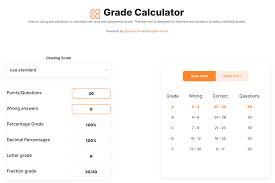
Understanding the Purpose of a Grade Calculator
An easy grade calculator for exam results is a simple yet powerful tool that helps students quickly determine their overall performance in a course or exam. Instead of manually calculating percentages, weighted scores, or GPA, a grade calculator automates the process and reduces the chances of errors. It is widely used by students, teachers, and academic advisors to estimate final grades before official results are released.
The main goal of such a tool is to provide clarity. Students often struggle to understand how different assignments, quizzes, midterms, and finals contribute to their final score. A grade calculator brings everything together in one place, making academic planning more efficient and less stressful.
How an Easy Grade Calculator Works
An easy grade calculator works on basic mathematical formulas. It takes inputs such as marks obtained, total marks, and weightage of each assessment. After processing this data, it provides a final percentage or grade.
For example, if a student has three components:
- Quiz: 80/100 (20% weight)
- Midterm: 70/100 (30% weight)
- Final exam: 90/100 (50% weight)
The calculator multiplies each score by its weight and then adds them together to generate the final result. This eliminates manual calculations and ensures accuracy.
Most modern calculators also support GPA conversion, letter grades (A, B, C, D, F), and even pass/fail outcomes depending on institutional grading systems.
Benefits for Students and Teachers
One of the biggest advantages of using an easy final grade calculator for exam results is time efficiency. Students no longer need to spend time figuring out complex formulas or recalculating scores repeatedly. With just a few inputs, they can instantly see where they stand academically.
Another major benefit is error reduction. Manual calculations can lead to mistakes, especially when dealing with weighted grading systems. A small error can significantly change the final outcome, but a calculator ensures precision.
Teachers also benefit from these tools. They can quickly evaluate class performance, set grade boundaries, and identify students who may need additional support. This makes the grading process more transparent and consistent.
Features of a Good Grade Calculator
A reliable grade calculator includes several useful features that improve user experience:
- Simple Interface: Easy input fields for marks and weightage
- Multiple Subjects Support: Ability to calculate grades for different courses
- Weighted Average Calculation: Accurate handling of percentage-based grading systems
- Instant Results: Real-time calculation without delays
- GPA Conversion: Option to convert percentages into GPA or letter grades
- Mobile-Friendly Design: Accessibility on smartphones and tablets
These features make the tool suitable for students at all academic levels, from school to university.
Importance in Academic Planning
An easy grade calculator is not just about calculating results—it also plays a role in academic planning. Students can use it to set target grades and determine how much they need to score in upcoming exams to achieve their desired final result.
For instance, if a student wants an A grade, they can input their current scores and calculate the minimum marks required in the final exam. This helps in better preparation and goal setting.
Additionally, it encourages students to take responsibility for their learning by tracking their progress throughout the semester instead of waiting for final results.
Conclusion
In today’s fast-paced educational environment, an easy grade calculator for exam results has become an essential tool for both students and educators. It simplifies complex grading systems, saves time, and ensures accuracy in academic evaluations. More importantly, it helps students stay informed about their performance and plan their studies more effectively. Whether you are preparing for school exams or university assessments, using a grade calculator can make your academic journey smoother and more organized.
