
If you’re exploring quick and easy design tools, you’ve probably come across adobe express edit. This powerful feature inside Adobe Express is built for users who want fast, professional edits without needing advanced design skills. Whether you’re creating social media posts, marketing visuals, or quick image fixes, Adobe Express Edit offers a simple yet effective solution.
In this complete guide, we’ll cover everything you need to know about adobe express edit, including features, benefits, pricing, and whether it’s worth using in 2026.
What Is Adobe Express Edit?
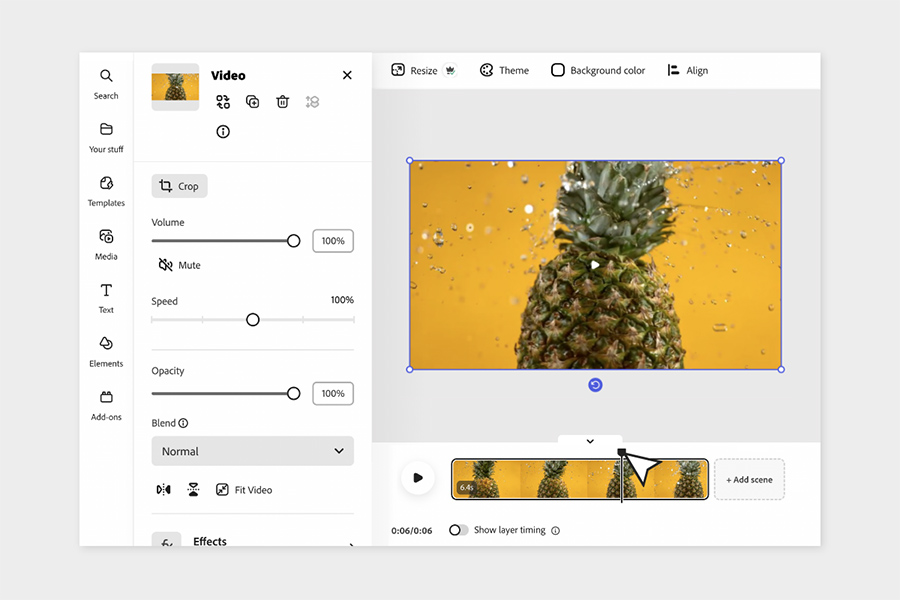
Adobe Express Edit is a user-friendly editing feature within Adobe Express, developed by Adobe. It allows users to quickly edit images, videos, and designs directly in their browser or mobile app.
Unlike complex tools like Adobe Photoshop, Adobe Express Edit focuses on simplicity and speed.
It can be considered a lightweight, beginner-friendly alternative to professional editing tools.
Key Features of Adobe Express Edit
1. Quick Image Editing
With adobe express edit, you can:
- Crop and resize images
- Adjust brightness, contrast, and colors
- Apply filters instantly
This makes it ideal for fast edits without technical expertise.
2. Background Removal
One of the most popular features is automatic background removal.
Users can upload an image, click remove background, and get results within seconds.
This is especially useful for:
- Product images
- Social media graphics
- Marketing materials
3. Drag-and-Drop Design Tools
The platform includes a simple drag-and-drop editor that allows users to:
- Add text
- Insert icons and shapes
- Customize layouts
Even beginners can produce professional-looking designs.
4. Templates for Fast Creation
Adobe Express Edit provides thousands of ready-made templates for:
- Social media posts
- Flyers
- Posters
- Thumbnails
These templates significantly reduce design time.
5. Video Editing Capabilities
Users can also edit short videos by:
- Trimming clips
- Adding text overlays
- Including music
While not advanced, it is suitable for quick content creation.
6. AI-Powered Tools
Adobe integrates AI features similar to Adobe Firefly, enabling:
- Text-to-image generation
- Smart suggestions
- Automated enhancements
Adobe Express Edit vs Photoshop
| Feature | Adobe Express Edit | Adobe Photoshop |
| Ease of Use | Very Easy | Advanced |
| Editing Power | Basic to Moderate | Professional |
| Speed | Fast | Slower for detailed work |
| Learning Curve | Beginner-friendly | Steep |
| Best For | Quick edits | Complex design |
Adobe Express Edit is best for speed and simplicity, while Photoshop is suited for advanced professional work.
Pros of Adobe Express Edit
- Beginner-friendly interface
- Fast editing process
- Free plan available
- Supports multiple content types in one tool
Cons of Adobe Express Edit
- Limited advanced features
- Requires internet access
- Overuse of templates may reduce uniqueness
You may also like it:
Best Video Banane Wala Apps Photo – A Complete Guide – Aarya Editz
Photo Banane Wala Gallery – Best Apps To Edit & Save Photos
APK VN – Download Free & Modded Android Apps Safely
An Editz – Learn Creative Editing For Photos & Videos
Pricing Overview
Adobe Express Edit offers:
- Free plan with basic features
- Premium plan with additional templates and tools
Compared to Canva, it offers competitive pricing and strong integration with Adobe tools.
Who Should Use Adobe Express Edit?
Best For:
- Beginners in graphic design
- Social media managers
- Small business owners
- Content creators
Not Ideal For:
- Professional designers needing advanced tools
- Complex photo editing projects
How to Use Adobe Express Edit
- Visit Adobe Express
- Upload an image or select a template
- Use editing tools such as crop, filters, and text
- Apply AI features if needed
- Download or share your final design
The process is straightforward and requires no advanced skills.
Real User Feedback
Users generally appreciate:
- Ease of use
- Quick editing workflow
- Useful templates for content creation
Common concerns include:
- Limited control compared to Adobe Photoshop
- Dependence on internet connection
- Premium features behind a paywall
Final Verdict: Is Adobe Express Edit Worth It?
Adobe Express Edit is a practical solution for users who need fast and simple design tools. It is especially valuable for beginners and those creating social media or marketing content.
However, for advanced editing and professional-level design, tools like Adobe Photoshop remain the better option.
FAQs
1. Is Adobe Express Edit free?
Yes, it offers a free plan with essential features.
2. Can beginners use Adobe Express Edit?
Yes, it is designed for users with no prior design experience.
3. Is it better than Canva?
Both tools are similar, but Adobe Express integrates more effectively with Adobe software.
4. Can I edit videos in Adobe Express Edit?
Yes, but only basic video editing features are available.
