
In today’s digital world, photo editing apps are essential for content creators, students, freelancers, and social media users. One of the most popular apps in this space is PicsArt. But is it really worth using in 2026?
In this detailed review, we’ll explore PicsArt’s features, pros, cons, real user feedback, pricing, and whether it’s the right choice for you.
What Is PicsArt?
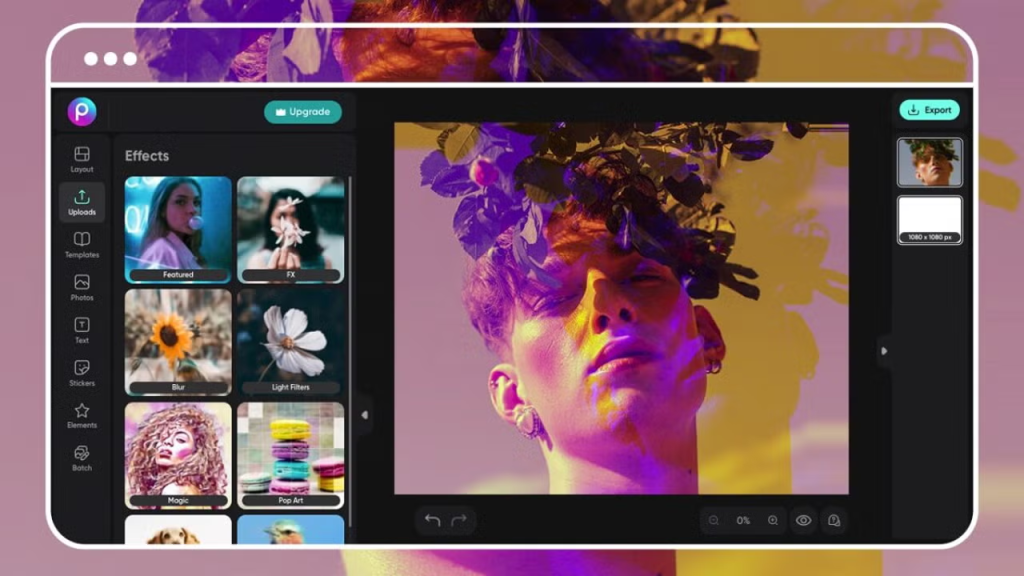
PicsArt is an all-in-one photo and video editing app that allows users to create stunning visuals with ease. It started as a mobile photo editor but has now evolved into a full creative platform.
With PicsArt, you can:
- Edit photos professionally
- Create social media graphics
- Add filters, effects, and stickers
- Generate AI images
- Edit short videos
Today, the app is used by over 150 million users worldwide, making it one of the most popular creative tools available.
Key Features of PicsArt
1. Powerful Photo Editing Tools
PicsArt offers advanced editing options like:
- Brightness, contrast, saturation adjustments
- Background remover
- Retouching tools
- Layer-based editing
These features make it suitable for both beginners and semi-professionals.
2. AI-Powered Editing
One of PicsArt’s biggest strengths is its AI tools, including:
- AI image generator
- Background replacement
- Smart filters and effects
These tools help users create professional-looking designs quickly.
3. Huge Library of Filters & Effects
PicsArt is famous for its creative filters like:
- Cartoon & anime styles
- Vintage effects
- Blur and cinematic filters
This makes it perfect for Instagram and TikTok content.
You may also like it:
Best Drawing Pictures Of Flowers – A Creative Guide -Aarya Editz
Editing Photos For Boy Background – A Unique Guide – Aarya Editz
Modern Texture Paint Designs For Office Spaces – Aarya Editz
4. Mobile-Friendly Experience
Unlike many editing tools, PicsArt is designed for mobile users. You can:
- Edit on the go
- Use trending templates
- Create viral content easily
Its mobile app is considered one of the best for social media editing.
5. Templates and Stickers
PicsArt offers thousands of:
- Templates
- Stickers
- Fonts
However, its template library is smaller compared to competitors like Canva.
PicsArt Pricing (2026)
PicsArt offers multiple pricing plans:
- Free Plan – Basic features with ads
- Plus Plan – Around $13/month
- Pro Plan – Around $15/month
- Advanced plans for businesses
While the free version is useful, many advanced features require a subscription.
Pros of PicsArt 👍
Here are the main advantages based on expert and user reviews:
- Easy to use (beginner-friendly)
- Strong AI editing tools
- Excellent mobile experience
- Affordable compared to competitors
- Great for social media content
- Fast resizing and editing tools
Cons of PicsArt 👎
Like any app, PicsArt has some drawbacks:
- Many features locked behind paywall
- Ads in the free version
- Limited templates compared to competitors
- Basic typography and design controls
- Customer support can be slow
Some users also report:
- Lag when using multiple effects
- Performance issues on older device
Real User Reviews (Honest Feedback)
⭐ Positive Feedback
Most users love PicsArt for:
- Creative freedom
- Easy editing tools
- AI features
It has strong ratings like:
- 4.5/5 on G2
- High app store ratings (millions of reviews)
⚠️ Negative Feedback (Reddit Insights)
From real user discussions on Reddit:
“Once you get to grips with the app then it’s quite powerful”
However, some complaints include:
- Too many paid features
- Subscription issues
- Features moving behind paywalls
“Almost everything is pro… locked behind a subscription”
This shows that while the app is powerful, pricing can frustrate some users.
PicsArt vs Competitors
Here’s how PicsArt compares to similar tools:
| Feature | PicsArt | Canva | Adobe Express |
| Ease of Use | Very Easy | Easy | Moderate |
| AI Tools | Strong | Moderate | Strong |
| Templates | Limited | Huge Library | Large |
| Mobile Experience | Excellent | Good | Good |
| Price | Affordable | Moderate | Expensive |
👉 PicsArt stands out for mobile editing and creativity, while Canva is better for templates.
Who Should Use PicsArt?
PicsArt is ideal for:
✔ Social media creators
✔ Beginners in photo editing
✔ Freelancers and bloggers
✔ Students creating visual projects
It may not be ideal for:
❌ Professional graphic designers needing advanced tools
❌ Users who want fully free editing
Final Verdict: Is PicsArt Worth It?
PicsArt is a powerful, beginner-friendly editing app that combines creativity, AI tools, and mobile convenience in one platform.
⭐ Overall Rating: 4.3 / 5
Best for:
- Social media content
- Quick edits
- Creative designs
Not ideal for:
- Advanced professional design work
👉 If you want an easy, fun, and creative editing tool, PicsArt is definitely worth trying. But if you need advanced design control, you might consider alternatives like Canva or Adobe tools.
Conclusion
PicsArt continues to be one of the most popular photo editing apps in 2026. Its combination of AI features, ease of use, and mobile-first design makes it a top choice for millions of users.
However, the increasing number of paid features means you’ll need a subscription to unlock its full potential.
FAQs About PicsArt Reviews
1. Is PicsArt free to use?
Yes, PicsArt offers a free version with basic editing tools, filters, and effects. However, many advanced features like AI tools, premium filters, and background remover are only available in the paid subscription.
2. Is PicsArt worth it in 2026?
PicsArt is worth it for beginners, social media users, and content creators who want quick and creative edits. Its AI tools and mobile-friendly interface make it a strong choice, but professionals may prefer more advanced software.
3. What are the main features of PicsArt?
PicsArt includes photo editing tools, AI image generation, background removal, filters, stickers, templates, and video editing features. It’s an all-in-one creative platform.
4. Is PicsArt safe to use?
Yes, PicsArt is generally safe to use and is available on official app stores. However, users should review app permissions and avoid sharing sensitive data.
5. Does PicsArt work offline?
Some basic editing features work offline, but many tools—especially AI features and content downloads—require an internet connection.
