
Clipchamp Auto Captions is a powerful feature that automatically converts spoken words in your videos into accurate on-screen text. Instead of creating captions manually, you can use Clipchamp’s AI-powered speech recognition technology to generate captions in just a few clicks. This saves time, improves accessibility, and helps make your videos more engaging for a wider audience.
Captions have become an essential part of modern video content. Many people watch videos with the sound turned off, especially on social media platforms like YouTube, Instagram, Facebook, and TikTok. By adding captions, viewers can easily follow your message even without audio. This leads to better engagement, longer watch time, and an improved viewing experience. Clipchamp Auto Captionsgimp Art
One of the biggest advantages of Clipchamp Auto Captions is its simplicity. After uploading your video, you can generate captions automatically, review the text for accuracy, make any necessary edits, and export your finished video. The feature also offers customization options, allowing you to change the font style, size, color, and placement of your captions to match your video’s design.
Whether you are a content creator, educator, business owner, marketer, or social media influencer, Clipchamp Auto Captions can help you create more professional and accessible videos. Accurate captions make your content easier to understand, improve accessibility for viewers with hearing impairments, and help reach audiences who speak different languages.
In this guide, you’ll learn everything you need to know about Clipchamp Auto Captions, including how they work, their key features, benefits, step-by-step setup, customization options, common issues, and practical tips for creating clear, engaging, and professional captions.
What Are Clipchamp Auto Captions?
Clipchamp Auto Captions is an AI-powered feature that automatically converts the spoken words in your video into on-screen text. Instead of typing captions manually, Clipchamp uses speech recognition technology to detect your voice and generate captions within a few moments. This makes the video editing process faster, easier, and more efficient. Clipchamp Auto Captionsgimp Art
Auto captions are especially useful for creators who regularly publish videos on platforms like YouTube, TikTok, Instagram, Facebook, and LinkedIn. They help viewers understand your content even when they watch videos without sound.
How Do Clipchamp Auto Captions Work?
The process is simple and beginner-friendly.
- Upload your video to Clipchamp.
- Open the Auto Captions feature.
- Select the language spoken in your video.
- Let Clipchamp analyze the audio. Clipchamp Auto Captionsgimp Art
- Review and edit the generated captions.
- Export your video with captions.
The entire process usually takes only a few minutes, depending on the video’s length.
How Does AI Generate Captions?
Clipchamp uses Automatic Speech Recognition (ASR) technology to identify spoken words and convert them into text. The AI listens to the audio, recognizes speech patterns, and creates synchronized captions that appear at the correct time in your video.
Although the technology is highly accurate, it may occasionally make mistakes, especially if the audio quality is poor or multiple people speak at the same time. Reviewing the captions before publishing is always recommended. Clipchamp Auto Captionsgimp Art
Who Should Use Clipchamp Auto Captions?
This feature is useful for many different users, including:
- YouTube creators
- Social media influencers
- Video editors Clipchamp Auto Captionsgimp Art
- Online teachers
- Business owners
- Digital marketers
- Students
- Freelancers
Anyone creating video content can benefit from automatic captions.
Why Are Auto Captions Important?
Captions improve the overall viewing experience and make videos accessible to more people.
Some key advantages include:
- Help viewers understand videos without sound
- Improve accessibility for people with hearing impairments
- Increase audience engagement
- Make videos easier to follow Clipchamp Auto Captionsgimp Art
- Reach a wider global audience
Things to Know Before Using Auto Captions
Before generating captions, keep these points in mind:
- Clear audio produces more accurate captions.
- Background noise can reduce caption accuracy.
- Always review and edit the generated captions.
- Select the correct language before starting the caption process.
Simple Understanding
Clipchamp Auto Captions automatically turn spoken words into text using AI-powered speech recognition. They save time, improve accessibility, and help create more professional videos by making content easier to watch and understand across different platforms. Clipchamp Auto Captionsgimp Art
Key Features of Clipchamp Auto Captions
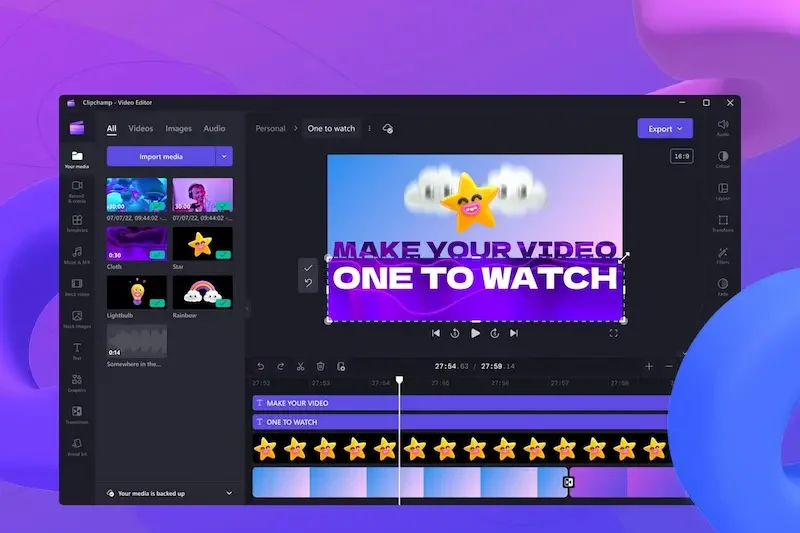
Clipchamp Auto Captions include several powerful features that make adding captions to videos quick, simple, and professional. Whether you’re creating content for YouTube, TikTok, Instagram, Facebook, or business presentations, these features help improve both your editing workflow and the viewer experience. Clipchamp Auto Captionsgimp Art
AI-Powered Speech Recognition
Clipchamp uses advanced AI technology to automatically convert spoken words into text.
Benefits include:
- Fast caption generation Clipchamp Auto Captionsgimp Art
- Accurate speech-to-text conversion
- Automatic synchronization with your video
- Less manual work
Automatic Caption Generation
You don’t have to type every subtitle yourself.
With a few clicks, Clipchamp can:
- Analyze your video’s audio
- Detect spoken words
- Generate captions automatically
- Save valuable editing time
Easy Caption Editing
After captions are generated, you can easily edit them.
You can:
- Correct spelling mistakes
- Fix punctuation
- Edit incorrect words Clipchamp Auto Captionsgimp Art
- Change caption timing
- Improve readability
Multiple Language Support
Clipchamp supports caption generation in multiple languages, making it easier to create videos for international audiences.
This helps you:
- Reach viewers worldwide
- Improve accessibility Clipchamp Auto Captionsgimp Art
- Create multilingual content
Customizable Caption Style
You can personalize the appearance of your captions to match your video’s design.
Customization options include:
- Font style
- Font size
- Text color Clipchamp Auto Captionsgimp Art
- Background color
- Caption position on the screen
Improved Accessibility
Captions make videos easier to understand for everyone.
They help:
- People with hearing impairments
- Viewers watching without sound
- Non-native speakers Clipchamp Auto Captionsgimp Art
- Users in noisy environments
Time-Saving Workflow
Auto captions significantly reduce editing time.
Instead of manually typing subtitles, you can:
- Generate captions in minutes
- Make quick edits Clipchamp Auto Captionsgimp Art
- Export your finished video faster
Professional Video Quality
Well-designed captions make your videos look more polished.
Professional captions can:
- Increase viewer trust Clipchamp Auto Captionsgimp Art
- Improve audience retention
- Enhance the overall viewing experience
Easy Export Options
Once your captions are complete, you can export your video with the captions included.
This makes it simple to publish your content on:
- YouTube
- TikTok Clipchamp Auto Captionsgimp Art
- Other video-sharing platforms
Simple Understanding
Clipchamp Auto Captions offer AI-powered speech recognition, automatic caption generation, easy editing, multilingual support, customizable styles, improved accessibility, and quick export options. These features help creators produce professional, engaging, and accessible videos while saving time during the editing process. Clipchamp Auto Captionsgimp Art
Benefits of Clipchamp Auto Captions
Clipchamp Auto Captions offer many advantages for content creators, businesses, educators, and anyone who creates videos. By automatically generating captions, this feature helps improve accessibility, increase viewer engagement, and save valuable editing time. Clipchamp Auto Captionsgimp Art
Save Time and Effort
One of the biggest benefits is that you don’t have to type captions manually.
Advantages include:
- Generate captions in minutes
- Reduce editing time
- Speed up video production Clipchamp Auto Captionsgimp Art
- Focus more on creating content
Improve Video Accessibility
Captions make videos easier for everyone to understand.
They are especially helpful for:
- People with hearing impairments
- Non-native English speakers Clipchamp Auto Captionsgimp Art
- Viewers watching videos without sound
- Users in noisy environments
Increase Viewer Engagement
Many people scroll through social media with their phone on silent. Captions help them understand your content without turning on the sound.
This can help:
- Increase watch time
- Keep viewers engaged Clipchamp Auto Captionsgimp Art
- Improve audience retention
- Encourage more interactions
Boost SEO and Online Visibility
Captions can improve your video’s discoverability.
Benefits include:
- Better keyword recognition
- Improved search visibility Clipchamp Auto Captionsgimp Art
- More opportunities to reach new audiences
- Increased organic traffic
Create Professional Videos
Well-formatted captions make videos look polished and professional.
Professional captions can:
- Improve brand image
- Build audience trust Clipchamp Auto Captionsgimp Art
- Make content easier to follow
- Enhance the viewing experience
Support Multiple Types of Content
Clipchamp Auto Captions work well for many types of videos, including:
- YouTube videos
- TikTok videos
- Instagram Reels
- Facebook videos
- Online courses
- Business presentations
- Marketing videos
- Product demonstrations
Easy to Edit
Even after captions are generated, you can quickly make changes.
You can:
- Correct spelling errors
- Edit punctuation
- Fix timing
- Improve readability
Reach a Wider Audience
Captions make your videos accessible to more people around the world.
They help you:
- Connect with international viewers
- Improve understanding
- Make content more inclusive
Simple Understanding
Clipchamp Auto Captions save time, improve accessibility, increase viewer engagement, enhance SEO, and give your videos a professional appearance. They are an excellent tool for anyone who wants to create high-quality videos that are easier to watch, understand, and share.
How to Use Clipchamp Auto Captions
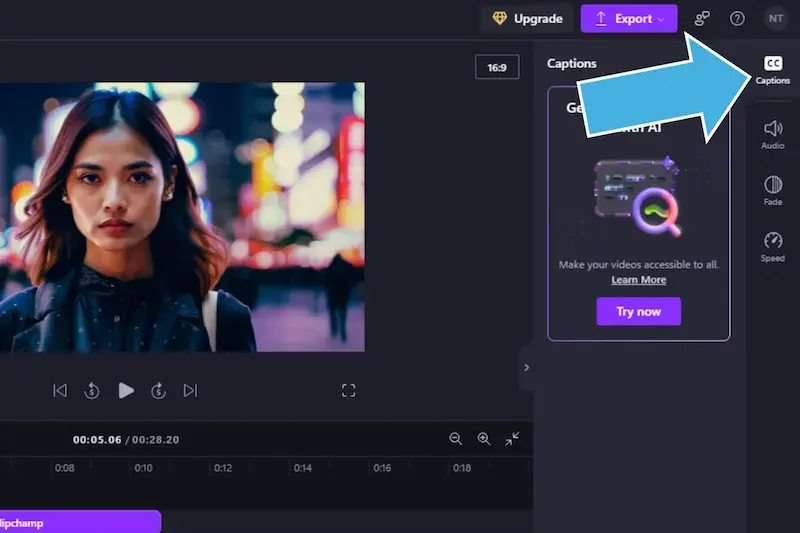
Using Clipchamp Auto Captions is simple, even if you are new to video editing. The feature automatically creates captions from your video’s audio, and you can review and edit them before exporting your final video.
Step 1: Open Clipchamp
Start by launching Clipchamp on your computer or through your web browser.
Then:
- Sign in to your account.
- Create a new video project.
- Select the aspect ratio that matches your video platform.
Step 2: Upload Your Video
Import the video you want to edit.
To do this:
- Click the Import Media button.
- Select your video from your device.
- Drag the video onto the editing timeline.
Make sure your video has clear audio for the best caption results.
Step 3: Enable Auto Captions
Once your video is on the timeline:
- Open the Captions or Auto Captions tool.
- Choose the language spoken in your video.
- Click Generate Captions.
Clipchamp will analyze the audio and automatically create captions.
Step 4: Review and Edit the Captions
After the captions are generated, carefully review them.
You should:
- Correct spelling mistakes.
- Fix punctuation.
- Edit any incorrect words.
- Adjust caption timing if needed.
- Split long captions into shorter lines.
Reviewing your captions ensures they are accurate and easy to read.
Step 5: Customize the Caption Style
You can personalize the appearance of your captions to match your video’s design.
Available options include:
- Change the font style.
- Adjust the font size.
- Select text and background colors.
- Move captions to a different position.
- Improve readability with better formatting.
Step 6: Preview Your Video
Before exporting, watch the entire video.
Check that:
- Captions appear at the correct time.
- Text is easy to read.
- There are no spelling or grammar mistakes.
- The overall video looks professional.
Step 7: Export the Final Video
When you are satisfied with your captions:
- Click the Export button.
- Choose your preferred video quality.
- Save the finished video to your device.
Your exported video will include the edited captions, ready to upload to platforms like YouTube, TikTok, Instagram, Facebook, or LinkedIn.
Tips for Better Auto Captions
For the best results:
- Use a high-quality microphone.
- Record in a quiet environment.
- Speak clearly and at a steady pace.
- Avoid overlapping voices.
- Always proofread your captions before publishing.
Simple Understanding
Creating Clipchamp Auto Captions is easy. Upload your video, generate captions automatically, review and edit the text, customize the style, preview the video, and export the final version. Following these steps helps you create professional videos with accurate and easy-to-read captions.
What are Clipchamp Auto Captions?
Clipchamp Auto Captions are an AI-powered feature that automatically converts spoken words in your video into on-screen text. This makes videos more accessible and easier to understand.
Are Clipchamp Auto Captions free?
Clipchamp offers auto captions as part of its video editing features. Availability may depend on your Clipchamp plan and the features included in your account.
How accurate are Clipchamp Auto Captions?
Clipchamp Auto Captions are generally accurate when the audio is clear. However, background noise, strong accents, or multiple speakers may reduce accuracy, so it’s always recommended to review and edit the captions.
Conclusion
Clipchamp Auto Captions are a valuable tool for anyone who wants to create professional, accessible, and engaging videos. By using AI-powered speech recognition, Clipchamp automatically converts spoken words into captions, helping you save time and reduce the effort of creating subtitles manually.
One of the biggest advantages of Clipchamp Auto Captions is their ease of use. You can generate captions in just a few clicks, edit them for accuracy, customize their appearance, and export your finished video. This makes the feature suitable for beginners as well as experienced video creators.
Captions also improve the viewing experience by making videos easier to understand for people watching without sound, viewers with hearing impairments, and audiences who speak different languages. In addition, well-written captions can increase viewer engagement, improve accessibility, and help your videos reach a wider audience.
Before publishing your video, always review the automatically generated captions to correct any errors and ensure they match your spoken content. Clear audio and careful editing will produce the best results.
Whether you’re creating content for YouTube, TikTok, Instagram, Facebook, online courses, or business presentations, Clipchamp Auto Captions can help you produce high-quality videos that are more inclusive, professional, and enjoyable to watch. By using this feature effectively, you can save time, enhance your content, and deliver a better experience for every viewer.
