
Learning how to edit Instagram Reels is one of the best ways to create eye-catching content and grow your presence on Instagram. Reels have become one of the platform’s most popular features, allowing users to share short, creative videos that can reach a large audience. Whether you are a beginner, content creator, influencer, student, or business owner, editing your Reels properly can make your videos more engaging and professional.
Good editing helps you capture viewers’ attention within the first few seconds. By trimming unnecessary clips, adding music, inserting text, using smooth transitions, and applying creative effects, you can make your Reels more entertaining and easier to watch. Well-edited videos often receive more views, likes, comments, and shares, which can improve your overall Instagram performance.
The best part is that you don’t need expensive equipment or advanced editing skills to create impressive Instagram Reels. You can edit videos directly in the Instagram app or use free video editing apps that provide additional features and creative tools.
In this guide, you’ll learn how to edit Instagram Reels step by step, discover the best editing apps, understand how to add music, captions, effects, and transitions, and find useful tips to improve your video quality. By the end of this article, you’ll have everything you need to create engaging Instagram Reels that stand out and attract more viewers.
What Is Instagram Reels Editing?
Instagram Reels editing is the process of improving and customizing your short videos before sharing them on Instagram. It involves making changes that help your videos look more attractive, professional, and engaging for viewers. Whether you record your video inside Instagram or upload an existing clip, editing allows you to enhance the final result with different creative tools.
Learning how to edit Instagram Reels helps you create content that captures attention quickly and keeps viewers watching until the end.
What Can You Edit in Instagram Reels?
Instagram provides several built-in editing features, and third-party apps offer even more advanced options.
You can edit:
- Trim and cut video clips
- Rearrange video segments
- Add background music
- Insert text and captions
- Apply filters and visual effects
- Add stickers and emojis
- Adjust video speed
- Include smooth transitions
- Improve brightness and colors
- Add voiceovers
Why Is Editing Important?
Editing makes your videos more interesting and easier to watch. A well-edited Reel can:
- Capture attention in the first few seconds
- Tell a clear story
- Remove unnecessary footage
- Improve video quality
- Increase viewer engagement
- Make your content look more professional
Basic Editing vs Advanced Editing
If you are a beginner, basic editing usually includes:
- Trimming clips
- Adding music
- Inserting text
- Applying simple filters
- Exporting the final video
As you gain experience, you can learn advanced editing techniques such as:
- Motion effects
- Color correction
- Smooth transitions
- Speed ramping
- Animated captions
- Professional audio editing
You may also like it:
Best Boy Photo Editor For Men: A Unique Guide – Aarya Editz
Edit Photos With Best Headshot And GFX Tools – Aarya Editz
Best Death Photo Frames Online Editing – Complete Guide – Aarya Editz
Can Beginners Edit Instagram Reels?
Yes. Anyone can learn how to edit Instagram Reels. The Instagram app itself offers beginner-friendly editing tools, while free apps like CapCut, InShot, and VN Video Editor provide additional features that are easy to use.
With regular practice and the right editing tools, even beginners can create high-quality Reels that look polished, creative, and ready to share with a larger audience.
Why Edit Instagram Reels
Editing your Instagram Reels can make a huge difference in how your videos look and perform. A well-edited Reel is more likely to grab attention, keep viewers interested, and encourage them to like, comment, share, or follow your account. If you want to learn how to edit Instagram Reels, understanding the benefits of editing is an important first step.
Capture Attention Quickly
Instagram users scroll through content very quickly. The first few seconds of your Reel are the most important.
Good editing helps you:
- Create a strong opening
- Remove slow or unnecessary scenes
- Keep viewers watching longer
Improve Video Quality
Editing allows you to enhance your videos by:
- Adjusting brightness
- Improving colors
- Increasing sharpness
- Stabilizing shaky footage
- Enhancing audio quality
Better-looking videos often receive more engagement.
Make Your Content More Professional
Even simple editing techniques can make your Reels look polished.
You can:
- Add smooth transitions
- Insert attractive text
- Use matching fonts and colors
- Include background music
- Create a consistent editing style
This helps build a professional-looking Instagram profile.
Increase Viewer Engagement
Well-edited Reels are easier to watch and more entertaining.
Adding elements like:
- Captions
- Music
- Effects
- Stickers
- Creative transitions
can encourage viewers to stay until the end and interact with your content.
Support Your Brand or Personal Style
If you are a business owner, influencer, or content creator, editing helps maintain a consistent visual style across all your videos.
Consistent editing makes your content more recognizable and memorable.
Boost Your Reach
Instagram often promotes engaging Reels to more users. Although editing alone does not guarantee viral success, high-quality videos are more likely to be watched, shared, and recommended by the platform.
Save Time During Recording
You don’t have to record everything perfectly in one take. Editing allows you to remove mistakes, combine multiple clips, and improve the final video after recording.
Suitable for Every Type of Creator
Whether you create:
- Educational videos
- Travel content
- Product reviews
- Fashion tips
- Food videos
- Entertainment clips
learning how to edit Instagram Reels helps you present your ideas in a more attractive and professional way, increasing the chances of reaching a larger audience.
Things You Need Before Editing Instagram Reels
Before you start learning how to edit Instagram Reels, it’s helpful to prepare everything in advance. Having the right tools and content ready will make the editing process easier, faster, and more enjoyable.
A Smartphone or Laptop
You can edit Instagram Reels using a smartphone or a laptop. Most creators prefer editing on their phones because it is quick and convenient, while laptops offer more advanced editing features for detailed projects.
An Instagram Account
You need an active Instagram account to create, edit, and publish Reels. Make sure your app is updated to the latest version so you can access all the newest editing features.
Good Quality Video Clips
The quality of your final Reel depends on the quality of the original footage. Record videos in good lighting and at a high resolution whenever possible.
For better results:
- Use natural lighting
- Keep the camera steady
- Record in portrait mode
- Capture clear audio
A Video Editing App
Although Instagram has built-in editing tools, many creators use additional apps for more creative control.
Popular editing apps include:
- CapCut
- InShot
- VN Video Editor
- Adobe Premiere Rush
- Canva
These apps offer extra features such as advanced transitions, animations, and color adjustments.
Music or Audio
Adding background music or trending audio can make your Reels more engaging. You can use:
- Instagram’s music library
- Original voice recordings
- Royalty-free music
- Sound effects
Always ensure you have permission to use any audio outside Instagram’s built-in library.
Stable Internet Connection
A reliable internet connection is useful for:
- Uploading Reels
- Downloading music
- Saving projects to the cloud
- Accessing templates and effects
Enough Storage Space
Videos and editing projects can take up a lot of storage. Before you begin:
- Free up unnecessary files
- Keep enough space for exported videos
- Save important projects in cloud storage or on an external drive if needed
Plan Your Content
Before editing, decide:
- The purpose of your Reel
- The message you want to share
- The order of your clips
- The music and text you want to include
Planning ahead will make editing much faster and help you create a more engaging final video.
By preparing these essentials before you begin, you’ll have a smoother experience and be able to create high-quality Instagram Reels with confidence.
Best Apps to Edit Instagram Reels
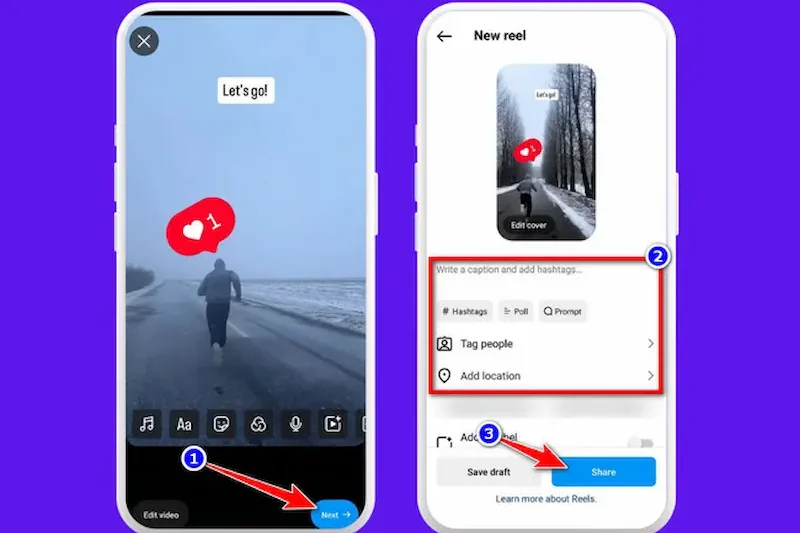
If you want to create high-quality content, choosing the right editing app is just as important as recording a good video. While Instagram offers built-in editing tools, many creators use third-party apps because they provide more features, better effects, and greater creative control.
Here are some of the best apps for learning how to edit Instagram Reels.
CapCut
CapCut is one of the most popular apps for editing Instagram Reels. It offers a simple interface and many professional editing features for free. How To Edit Instagram Reels
Key Features
- Easy video trimming
- Smooth transitions
- Auto captions
- Trending effects How To Edit Instagram Reels
- Speed control
- Filters and animations
- High-quality video export How To Edit Instagram Reels
Best For: Beginners and content creators.
InShot
InShot is another beginner-friendly editor that makes it easy to create social media videos.
Key Features
- Cut and trim videos
- Add music
- Insert text and stickers
- Video filters How To Edit Instagram Reels
- Adjust video speed
- Export in high quality
Best For: Quick Instagram Reel editing.
VN Video Editor
VN Video Editor provides advanced editing tools without being difficult to use.
Key Features
- Multi-layer timeline
- Professional transitions
- Text animations
- Keyframe editing How To Edit Instagram Reels
- Audio adjustments
- High-resolution export
Best For: Intermediate and advanced users.
Adobe Premiere Rush
Adobe Premiere Rush is designed for creators who want professional editing tools on both mobile devices and computers.
Key Features
- Multi-track editing
- Color correction How To Edit Instagram Reels
- Audio enhancement
- Cloud synchronization How To Edit Instagram Reels
- Direct social media export
Best For: Professional creators and business users.
Canva
Canva is well known for graphic design, but it also offers useful video editing features.
Key Features
- Ready-made Reel templates
- Animated text
- Video effects
- Royalty-free music
- Drag-and-drop editing How To Edit Instagram Reels
Best For: Marketing videos and branded content.
Instagram Reels Editor
Instagram’s built-in editor is perfect for quick editing before publishing.
Key Features
- Add trending music
- Apply filters How To Edit Instagram Reels
- Insert text
- Add stickers
- Adjust video speed
- Record directly in the app
Best For: Simple editing without installing another app.
Which App Should You Choose?
The best app depends on your editing needs.
- CapCut: Best overall for Instagram Reels.
- InShot: Best for beginners. How To Edit Instagram Reels
- VN Video Editor: Best for advanced editing.
- Adobe Premiere Rush: Best for professional creators.
- Canva: Best for business and promotional Reels. How To Edit Instagram Reels
- Instagram Reels Editor: Best for quick edits inside Instagram.
Using the right editing app will make how to edit Instagram Reels much easier and help you create engaging videos that stand out on Instagram.
How do I edit Instagram Reels?
You can edit Instagram Reels by using the built-in Instagram editor or a third-party app such as CapCut, InShot, VN Video Editor, or Adobe Premiere Rush. These tools allow you to trim clips, add music, insert text, apply effects, and export high-quality videos.
How do I add music to Instagram Reels?
You can add music directly from Instagram’s music library while creating your Reel. If you edit your video using another app, you can also add royalty-free music before uploading it to Instagram.
How do I trim Instagram Reels?
Open your Reel in the editing app, select the Trim or Split tool, remove unwanted sections, and save your changes before exporting the video.
Conclusion
Learning how to edit Instagram Reels is an excellent way to create more engaging and professional content for your audience. With the right editing techniques, you can turn simple video clips into eye-catching Reels that capture attention and encourage viewers to like, comment, and share your content.
You don’t need expensive equipment or advanced editing skills to get started. By using Instagram’s built-in editing tools or beginner-friendly apps like CapCut, InShot, or VN Video Editor, you can easily trim videos, add music, insert text, apply transitions, and improve the overall quality of your Reels. How To Edit Instagram Reels
As you continue practicing, you’ll become more confident with different editing features and develop your own creative style. Focus on creating clear, entertaining, and valuable content while keeping your videos simple and easy to watch.
With consistent practice and the tips shared in this guide, you’ll be able to master how to edit Instagram Reels and create high-quality videos that help grow your Instagram profile and reach a wider audience.
