
If you’re trying to understand Adobe Encore, think of it as a “final packaging tool” for videos. It wasn’t used for editing clips like Premiere Pro. Instead, Adobe Encore was designed to take your finished video and turn it into a professional DVD or Blu-ray with menus, chapters, and navigation.
Back when DVDs were the main way people watched movies or shared video projects, this software was extremely important for filmmakers, wedding editors, and production studios.
Let’s explore it in detail.
What Exactly Was Adobe Encore?
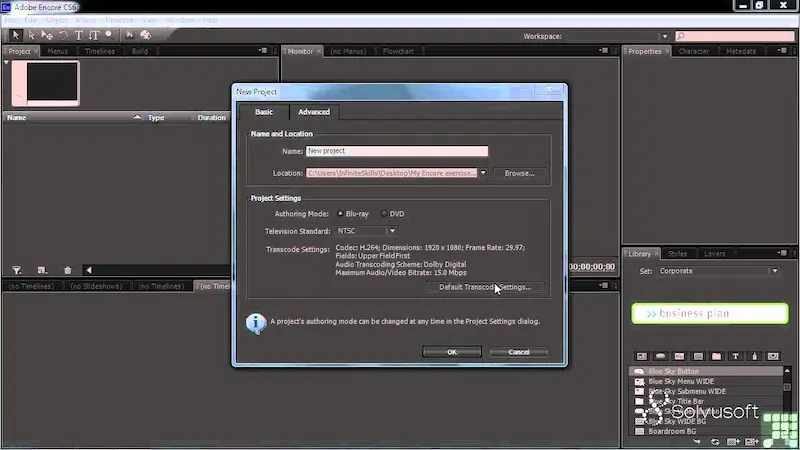
Adobe Encore was a DVD and Blu-ray authoring software developed by Adobe Systems. It allowed users to:
- Import finished video projects
- Create interactive DVD menus
- Add chapters and navigation
- Burn content onto DVDs or Blu-ray discs
- Package videos for playback on DVD players
In simple words:
It turned your video into a “clickable movie disc.”
So instead of just watching a long video, viewers could:
- Select scenes
- Jump to chapters
- Choose language tracks (in advanced projects)
- Navigate menus like a real movie DVD
How Adobe Encore Fit Into Adobe Workflow
Encore didn’t work alone. It was part of a bigger video production system:
1. Adobe Premiere Pro (Editing Stage)
This is where you:
- Cut videos
- Arrange clips
- Add transitions
- Export final timeline
2. Adobe After Effects (Effects Stage)
Used for:
- Motion graphics
- Visual effects
- Animated titles
3. Adobe Encore (Final Authoring Stage)
This is where you:
- Import final video
- Design DVD menus
- Add navigation structure
- Burn or export disc-ready files
So the workflow was like:
Edit → Enhance → Package
Encore was the “package” step.
Key Features of Adobe Encore
Let’s break down what made it powerful back in its time.
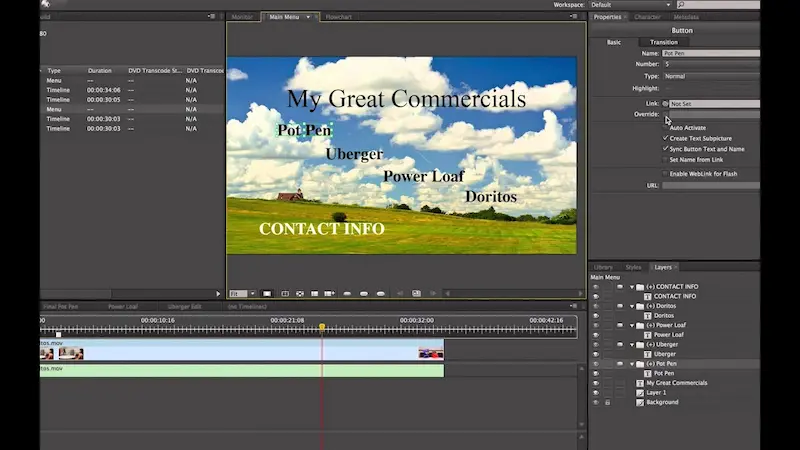
1. DVD Menu Creation
One of the biggest features was menu design.
You could create:
- Main menu screens
- Submenus
- Animated buttons
- Background music or video
For example:
A wedding DVD might have:
- “Play Full Video”
- “Ceremony”
- “Reception”
- “Photo Slideshow”
2. Chapter Markers
Encore allowed you to divide videos into sections.
This was useful for:
- Movies
- Documentaries
- Event recordings
Instead of watching everything, users could jump directly to parts.
3. Blu-ray Support
Later versions of Adobe Encore supported Blu-ray discs, which offered:
- Higher video quality
- More storage space
- Better menus
4. Integration with Adobe Tools
One of its strongest advantages was seamless integration:
- Direct import from Adobe Premiere Pro timelines
- Dynamic linking with After Effects compositions
- No need to re-export multiple times
This saved a lot of time for professionals.
5. Multiple Formats
You could output:
- DVD-Video
- Blu-ray
- Web DVD (interactive web version of DVD menus)
6. Custom Navigation Logic
Advanced users could control:
- Button behavior
- Menu loops
- Auto-play settings
- Multi-language navigation
It was almost like building a mini interactive software interface.
How Adobe Encore Worked (Simple Workflow)
Here’s what using it typically looked like:
Step 1: Import Video
You bring in your final exported video or Premiere Pro project.
Step 2: Create Project Structure
You define:
- Menus
- Submenus
- Chapters
Step 3: Design Menus
You choose:
- Background image/video
- Button style
- Text labels
- Navigation layout
Step 4: Link Everything
You connect:
- Buttons → videos
- Chapters → timeline points
- Menus → submenus
Step 5: Preview Project
You test how it behaves like a real DVD player.
Step 6: Burn or Export
Finally:
- Burn to DVD/Blu-ray
- Or export ISO image for later use
Why Adobe Encore Was So Popular
At its peak, Encore was widely used because:
- DVDs were the main distribution format
- Wedding videographers needed menu-based discs
- Film schools taught DVD authoring
- Businesses created training DVDs
- No easy alternative existed at the time
It gave creators full control over how viewers interacted with videos.
Limitations of Adobe Encore
Even though it was powerful, it had some drawbacks:
1. Outdated Technology
It relied heavily on DVD/Blu-ray, which are now obsolete.
2. Complex Interface
Beginners often found it confusing.
3. Limited Creative Freedom
Compared to modern tools, design flexibility was restricted.
4. No Longer Updated
Adobe stopped development years ago.
Why Adobe Discontinued Encore
The main reason is simple: technology changed.
Today:
- People stream videos instead of using DVDs
- YouTube replaced physical media
- Cloud storage replaced discs
So Adobe shifted focus to:
- Adobe Premiere Pro
- After Effects
- Adobe Media Encoder
These tools support modern digital content instead of physical discs.
What Replaced Adobe Encore Today?
Even though Encore is gone, its role has been replaced by different tools:
For Video Editing
- Adobe Premiere Pro
- DaVinci Resolve
For DVD Creation (rare use)
- DVDStyler
- Wondershare DVD Creator
For Modern Distribution
- YouTube
- Vimeo
- Streaming platforms
Most creators today completely skip DVD authoring.
Should You Still Learn Adobe Encore?
Honestly, in 2026:
No, it’s not worth learning for modern careers.
But it can still be useful if:
- You work with old DVD archives
- You restore legacy media projects
- You study video production history
Otherwise, your time is better spent learning:
- Premiere Pro
- Motion graphics
- Social media video editing
Final Thoughts
Adobe Encore played an important role in video production history. It was the bridge between raw edited footage and physical DVD distribution. For its time, it was powerful, professional, and widely used.
But like many older technologies, it became outdated when streaming and digital platforms took over.
Still, understanding Adobe Encore helps you see how far video editing has evolved—from burning DVDs to uploading content instantly online.
FAQs – Adobe Encore
1. What is Adobe Encore used for?
Adobe Encore was used to create professional DVD and Blu-ray discs. It allowed users to build interactive menus, add chapters, and package videos into disc-ready formats.
2. Is Adobe Encore still available in 2026?
No, Adobe Encore is no longer available. Adobe officially discontinued it after Creative Suite 6, and it is not included in Adobe Creative Cloud.
3. Why was Adobe Encore discontinued?
Adobe discontinued Encore because DVDs and Blu-ray discs became less popular. Most people now use streaming platforms like YouTube and Netflix instead of physical media.
4. Can I still install Adobe Encore today?
You may find older installation files from Adobe CS6, but it is not officially supported anymore. It may also not run properly on modern operating systems.
5. What replaced Adobe Encore?
There is no direct replacement from Adobe. However, modern tools like Adobe Premiere Pro combined with third-party DVD authoring software (like DVDStyler or Wondershare DVD Creator) are used instead.
