

Instagram is not only a platform for sharing photos and videos, but it also provides useful editing tools that can help make your pictures look better before you post them. You can adjust the brightness, contrast, colors, and other settings directly in Instagram without always needing another editing app.
Learning how to edit photos in Instagram is helpful if you want your pictures to look cleaner, brighter, and more attractive. Whether you are editing a selfie, travel photo, food picture, or everyday moment, Instagram gives you several simple options to improve the final result.
In this guide, we will explain how to edit photos in Instagram step by step. You will learn how to add filters, adjust brightness and contrast, crop photos, improve colors, and use other editing options. The goal is to help beginners edit their photos easily and create posts that look more polished.
What Does Editing Photos on Instagram Mean?
Editing photos on Instagram means making simple changes to a picture before sharing it as a post or using it in other Instagram content. Instagram provides built-in editing options that let you improve the appearance of a photo without needing advanced editing skills.
You can use filters to quickly change the overall look of your picture or use adjustment tools to control things such as brightness, contrast, warmth, saturation, and other visual settings. These tools can help you make a dull photo look brighter, improve colors, or create a particular style.
Editing a Photo vs Adding a Filter
A filter changes the overall appearance of a photo with a preset style. It is a quick way to give your picture a different look. You can usually adjust the strength of a filter so that it does not become too strong. How To Edit Photos In Instagram
Photo editing gives you more control. Instead of changing the entire picture at once, you can adjust individual settings such as brightness, contrast, highlights, shadows, and saturation. This allows you to make more precise changes.
Why Edit Photos on Instagram?
Editing can help your photos look more attractive and consistent before you share them. For example, you can brighten a dark picture, improve its colors, or crop unwanted parts of the image.
The best results usually come from small adjustments. You do not need to use every editing option. Start with the changes your photo actually needs and keep the final result natural. How To Edit Photos In Instagram
Learning how to edit photos in Instagram can make posting easier, especially if you want to improve your pictures without switching between multiple apps.
How to Edit Photos in Instagram
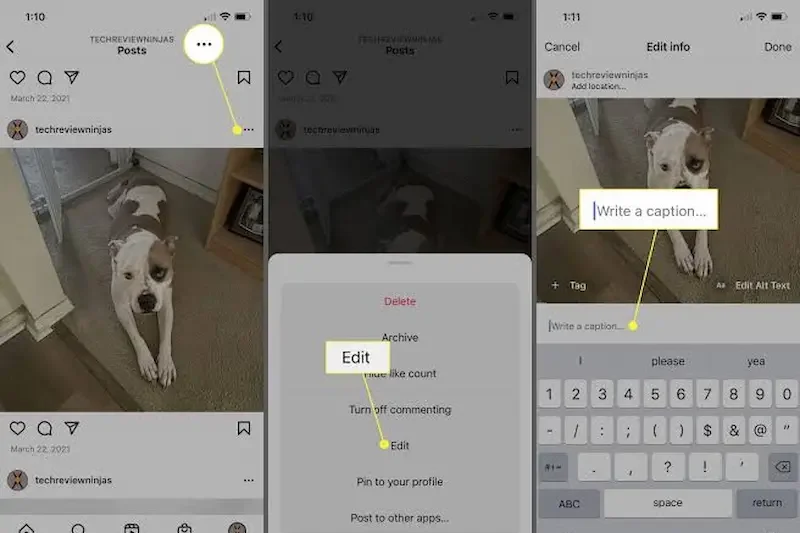
Instagram makes it easy to edit photos before sharing them. You can select a picture from your phone, apply a filter, and make manual adjustments to improve its appearance. You do not need advanced editing skills to get started.
Open Instagram and Select a Photo
First, open the Instagram app on your phone and start creating a new post. Select the photo you want to edit from your device’s gallery. After choosing the picture, Instagram will show you editing options before you publish the post. How To Edit Photos In Instagram
Choose a Filter
After selecting your photo, you can browse through the available Instagram filters. Tap different filters to see how they change the appearance of your picture. Choose one that matches the mood and style you want. How To Edit Photos In Instagram
If the filter looks too strong, adjust its intensity when the option is available. A lighter filter can often make the photo look more natural.
Adjust the Photo Manually
Instagram also provides adjustment tools that give you more control over the final appearance. Depending on the available editing options, you can change settings such as brightness, contrast, saturation, warmth, highlights, shadows, and sharpness.
Make small changes and check the photo after each adjustment. This helps you avoid making the image look too bright, too dark, or overly colorful.
Crop and Straighten the Photo
If your photo contains unwanted areas, use the crop option to remove them. You can also straighten a photo if the horizon or another important element looks tilted. How To Edit Photos In Instagram
Try to keep the main subject in a good position when cropping. A simple crop can make a photo look cleaner and more focused.
Preview Your Final Edit
Before sharing your photo, look at the complete image and make sure the changes look natural. Check the lighting, colors, sharpness, and overall composition.
Once you are happy with the result, continue with the posting process and add your caption or other details.
Learning how to edit photos in Instagram becomes easier with practice. Try different tools on different photos and use only the adjustments that actually improve your picture. How To Edit Photos In Instagram
How to Add Filters to Instagram Photos
Instagram filters are one of the easiest ways to change the look and mood of a photo. They can make your picture brighter, warmer, softer, or more colorful with just a tap. If you are learning how to edit photos in Instagram, filters are a good place to start.
Choose a Filter That Matches Your Photo
After selecting your photo for a new Instagram post, you can browse through the available filters. Tap different options to see how each one changes your picture.
Try to choose a filter that works well with the lighting and colors already present in your photo. A bright photo may look better with a soft filter, while a darker picture may benefit from a filter that adds more brightness. How To Edit Photos In Instagram
Adjust Filter Intensity
You do not always need to apply a filter at full strength. If a filter looks too strong, reduce its intensity when Instagram provides the adjustment option.
A lower filter intensity can help keep skin tones, colors, and details looking natural. This is especially useful for selfies, portraits, and photos where you want a realistic appearance.
Avoid Using Too Many Filters
Using several strong effects can make a photo look unnatural or reduce its original detail. Instead, choose one filter that fits your photo and make small adjustments if necessary. How To Edit Photos In Instagram
The goal of editing is to improve your photo rather than completely change it. Simple and balanced edits often produce a cleaner and more professional-looking result.
How to Adjust Brightness on Instagram
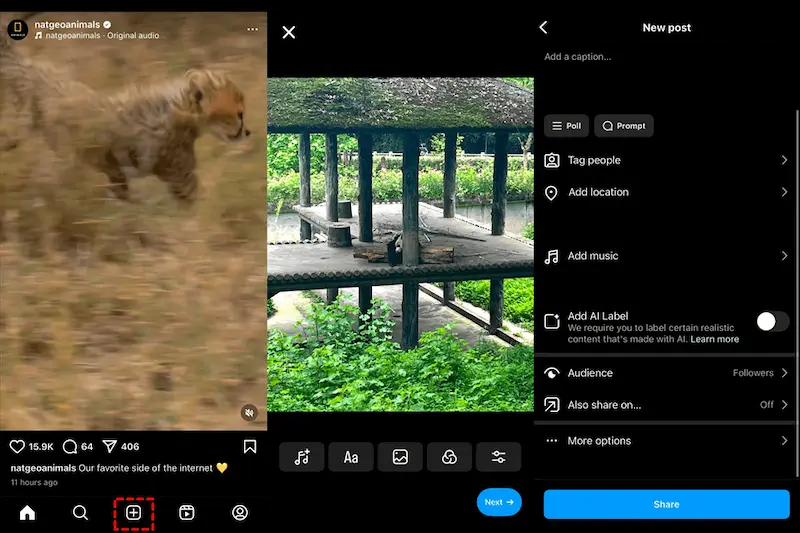
Brightness is one of the most useful settings when editing a photo on Instagram. It can help make a dark picture clearer or reduce the dull appearance of an image. When learning how to edit photos in Instagram, understanding brightness can make a noticeable difference. How To Edit Photos In Instagram
Increase Brightness for Dark Photos
If your photo looks too dark, you can increase the brightness using Instagram’s editing tools. Move the brightness adjustment gradually until the main subject becomes easier to see. How To Edit Photos In Instagram
Avoid increasing it too much because an overly bright photo can lose important details, especially in areas that are already well lit.
Reduce Brightness When a Photo Is Too Bright
Sometimes a picture may have too much light, particularly when it is taken outdoors or under strong lighting. In this situation, slightly reducing the brightness can create a more balanced appearance.
Make small adjustments and compare the edited version with the original photo. This makes it easier to find a level that looks natural. How To Edit Photos In Instagram
Keep the Photo Looking Natural
The goal of brightness adjustment is not to make every photo extremely bright. Instead, try to create a balanced image where the subject and important details are clearly visible. How To Edit Photos In Instagram
After adjusting brightness, check other areas of the photo as well. A good edit should improve the overall picture without making the highlights look washed out.
Brightness Tips for Instagram Photos
Use small adjustments instead of moving the setting to an extreme level. If the photo is still not balanced, you can combine brightness changes with contrast, highlights, or shadows.
With a little practice, adjusting brightness becomes a simple part of how to edit photos in Instagram and can help your pictures look cleaner and more appealing.
How to edit photos in Instagram?
To edit a photo in Instagram, select a picture while creating a new post, choose a filter, and use the available adjustment tools to change brightness, contrast, colors, and other settings. Preview your edits before sharing the post.
Can I edit photos directly on Instagram?
Yes, Instagram provides built-in photo editing options. You can apply filters and make different adjustments to your photo before publishing it.
How do I add a filter to an Instagram photo?
Select your photo when creating a new post and browse through the available filters. Tap a filter to apply it and adjust its intensity when the option is available.
Conclusion
Learning how to edit photos in Instagram is simple, even if you are a beginner. Instagram provides useful built-in tools that let you improve your photos with filters, brightness, contrast, colors, cropping, and other adjustments without needing another editing app.
For the best results, try to keep your edits natural and make small changes according to the photo. A good-quality picture combined with the right editing settings can make your Instagram posts look more attractive and professional.
Whether you are editing selfies, travel photos, food pictures, or everyday moments, these simple Instagram editing tools can help you create better-looking posts. With a little practice, you can easily make your photos ready to share on Instagram.
